
State at a glance
The ring reads READY, WORKING, NEEDS YOU — with a live waveform while you talk. It follows whichever VS Code window has your keyboard, so it is always showing the session you are actually in.
The hardware
A palm-sized round touchscreen that gives your coding agent a face. State at a glance, voice in, spoken replies out, approvals with a swipe — and it works with Claude Code, GitHub Copilot Chat and local models on your own GPU, because it drives VS Code itself rather than one vendor's agent. This one is built to move around with you — pocket, bag, kitchen counter, the sofa. A desktop model that stays put on the desk is coming in the near future.
It is an accessory, not the product. SofaCode is the app and the desktop daemon, and any Android 8.0-and-up phone or iPhone drives the same sessions — an old handset out of a drawer included. The Node runs the same node mode as those, in something you can leave on the desk.
What it is
Your agent runs on your own machine, in VS Code. The SofaNode sits on the desk beside it and shows you what it is doing — and lets you answer without touching the keyboard. It is the same live deck the SofaCode app shows on a phone, as an object you can glance at. Renders for now: the reference hardware the Node is built on, with the firmware's own screen output on the glass — every pixel below is what the device draws. Photos of production units are being shot and will replace these.


The ring reads READY, WORKING, NEEDS YOU — with a live waveform while you talk. It follows whichever VS Code window has your keyboard, so it is always showing the session you are actually in.

Tap to dictate straight into your editor, hold to submit. No wake word, no cloud assistant, no push-to-talk app to alt-tab into.

Answers come back spoken through its speaker — pick the voice, or turn it off. Tap to interrupt mid-sentence, the way you would interrupt a person.

A permission prompt lands as a card on the dial: swipe up to allow, down to deny. First answer wins across every device, so the phone stays in your pocket.
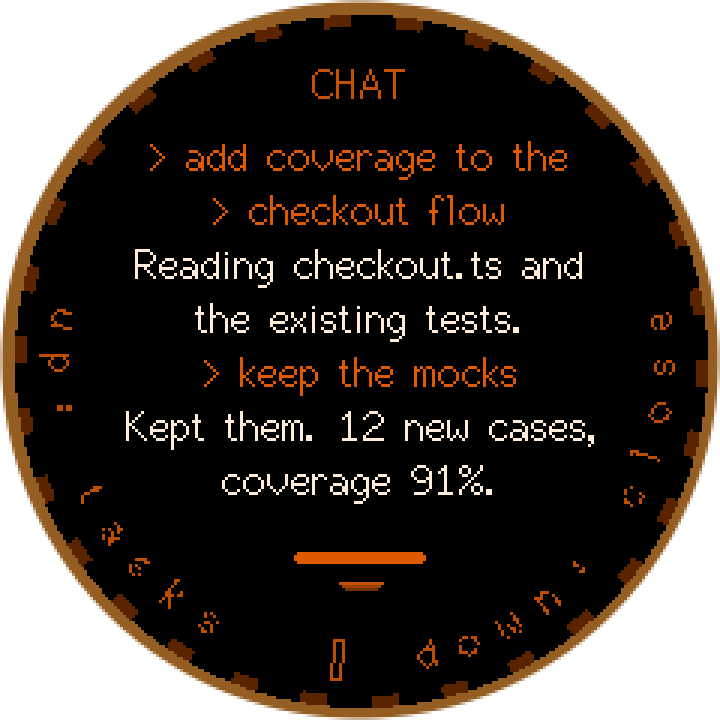
Swipe up for the live transcript — your turns in orange, the agent's in white — and scroll it by running a finger around the rim, the way you would turn a dial.
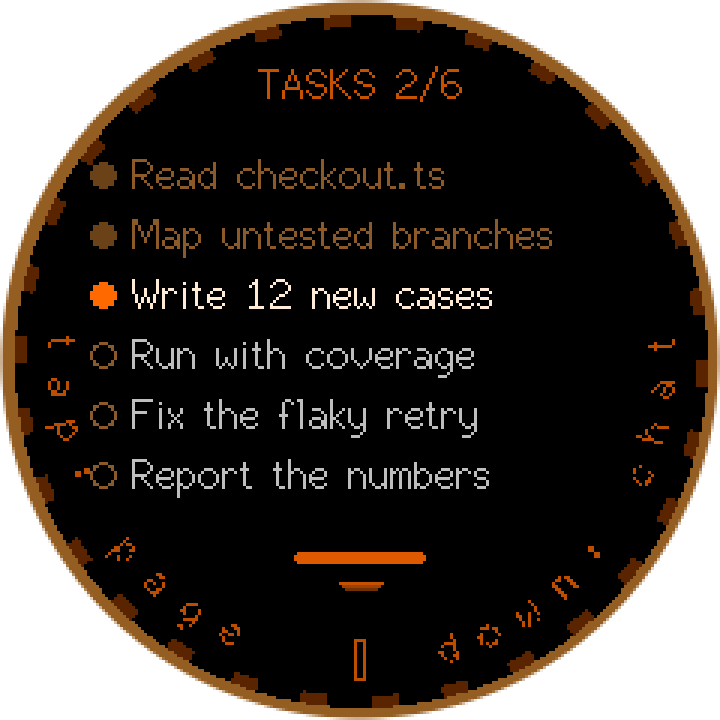
Swipe again for the session's task list — the running task pulses and reads brightest, finished ones tick off and dim.
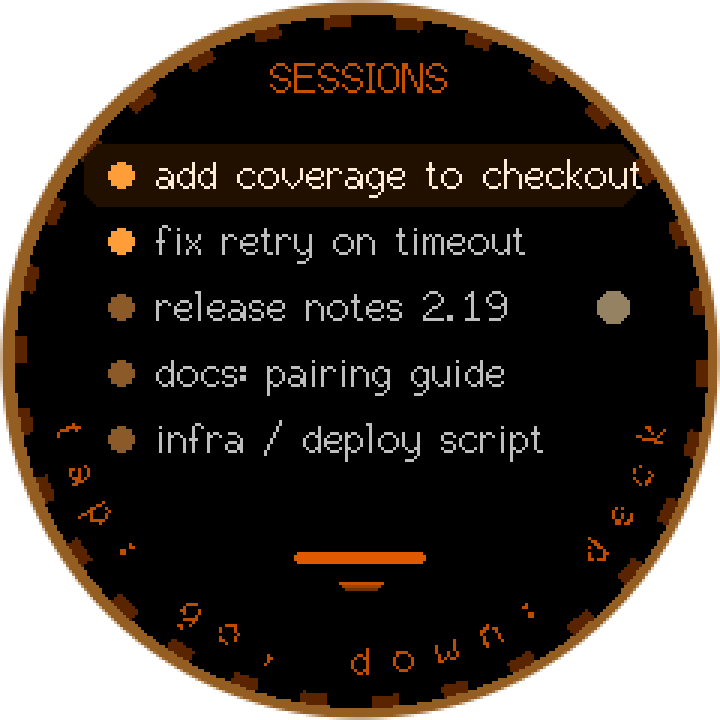
The rim scrubs the machine's VS Code windows; roll past either end and it switches machines. Desktop, laptop, the box in the closet — up to six machines, each with its own credentials.

Pairing is a QR on the glass with the address and a 16-character code under it — scan from the SofaCode app, or tap Enter code instead in the app and type the address and code. Every machine you have already paired lands on the device at once.
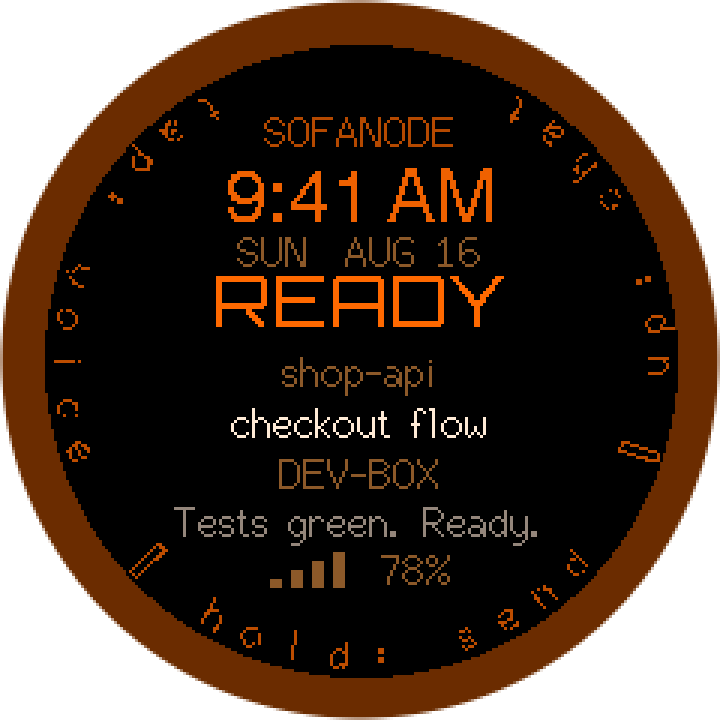
Nothing happening? It is a quiet desk clock that names the session and machine it is following — and sleeps to a microamp standby from the menu.
Why it is different
Every other desk gadget for AI coding is welded to a single vendor: it speaks one company's API, so it works with one company's agent, and the day you switch you own a paperweight. The SofaNode does something simpler and far more durable — it drives your editor: VS Code, and its forks in beta. Whatever agent lives in your editor is an agent the Node can run — including models running on your own hardware, with no API key and no per-token bill.
Full support today: live transcript, permission prompts on the dial, session switching, task lists, spoken replies.
Full support today, including the model picker — the Node can drive whichever model your Copilot subscription offers.
Run Llama, Qwen, DeepSeek, Mistral, Gemma or anything else in LM Studio or Ollama and drive it from the Node, through Local LLM (beta), built into the SofaCode extension. No API key, no token bill, no data leaving the building.
Full support today: the Codex CLI and the Codex VS Code extension — sessions, live state, one-tap approvals, permission modes, usage and the model picker, on the same deck.
New agents arrive as editor extensions now. Because the Node talks to the editor, adding one is a daemon update — not new hardware.
| SofaNode | Single-vendor desk gadgets | |
|---|---|---|
| Agents supported | Claude Code + Copilot Chat + OpenAI Codex + local models | One, whichever the vendor sells |
| Runs models on your own hardware | Yes — LM Studio, Ollama or any OpenAI-compatible server, built into the extension (beta) | No — their cloud, their key, their bill |
| Where your code lives | Your machine. Always. | Usually the vendor's cloud |
| What it talks to | VS Code on your LAN | A hosted API |
| Your code stays on your LAN | Yes — the daemon is on your machine, nothing routes through us | No |
| If you switch agents | Same device, keeps working | New device |
| Extra subscription for the hardware | None — the Node never needs one | Often a second subscription on top |
The SofaNode works forever without a subscription. Everything the device does — the live deck, voice, spoken replies, approvals, session switching — is included in the unit, and the daemon on your computer never asks it for a plan. The 3 months of SofaCode in the box are for the phone and watch apps, which are the subscription product; after that the Node keeps working on its own whether or not you subscribe. No account on our servers either — pairing is between your device and your machine.
Everything it does
Tap and speak; the text lands in the agent's prompt on your machine. Hold to submit. Speech is transcribed by your daemon, on your hardware.
Replies read aloud in a voice you choose. A tap stops it dead. Hold on the chat screen to turn read-aloud on or off — it is the same voice switch as the menu's Voice row, for every session.
Every tool approval your agent asks for can be answered on the Node — allow, deny, with the command visible. Answered once, everywhere.
The conversation, on the dial. Tap to jump to newest, hold to toggle reading aloud, run a finger around the rim to scroll back.
Watch the agent's plan tick off in real time — the running task reads brightest with a pulsing dot, finished ones dim. Swipe up twice from the deck.
Swipe right for the machine's sessions, grouped by VS Code window — up to twenty-four in the list, five on screen as you turn the rim. Hold on one and the Node follows it — ring, transcript, tasks and spoken replies — and stays there until you go back to your keyboard. Turn the rim on the deck for a blind flick between windows, and roll past the end to switch machines. Menu > Machines lists everything you have paired; tap one to switch the Node to it.
Running several agents at once, only the session you're on is read aloud — the rest would be noise. When one of the others stops, whether it finished or it wants you, it holds its last reply and raises a dot. Swipe right to the sessions list. Tap the row and pick Play reply; once you have heard it the same row offers Clear reply. A hold still switches to that session. Turn the voice off and the dots go with it — they're an offer to play something. Held replies in the menu sets how many of a session's last replies the Node keeps to play back — one to three.
Whichever VS Code window has your keyboard is the one the Node shows. Alt-tab and the device follows you. Pick a session on the Node, on a phone, or on any other paired device, and the switch carries everyone — every app and the Node land on it together. Take the keyboard again at the desk and that switch does the same.
Switch Touchpad on in the Node's menu and the dial drives the mouse pointer on the machine you are paired to: drag to move, tap to click, hold for a right-click, turn the rim to scroll. Pull down from the top edge to come back. The row only appears when your machine reports that it can move a pointer — the daemon answers that itself, so you are never handed a control that does nothing.
Once it is on Wi-Fi with nothing paired, the Node shows a QR. Scan it from the SofaCode app and every machine you have paired — remote domains included — lands on the Node at once, each with its own revocable token. No camera? Use Menu > Pair by code: the Node finds the machine, the computer shows an 8-digit code, and you dial it on the Node.
Join a network from the device itself: pick the SSID, dial the password on a character wheel, or use the phone-based softAP portal. Timezone too.
With remote access on, the Node roams — wss with a pinned certificate and the same mutual-HMAC handshake as the apps. A token never crosses the internet in the clear.
The first flash is required and done from your browser — Chrome and the USB-C cable, signed in with the credentials from your order. After that it updates itself over the air: firmware checks at boot and the menu's Update row checks on demand; Auto update and Update check set whether and how often it installs by itself. Updates never wipe your pairing, and the flasher stays available for a manual re-flash.
Distinct chimes for connect, done, needs you, error, mic on/off, send and approve — done and needs-you play softer for sessions you are not following. One volume for chimes, another for the voice — either can be muted from the menu. Menu > Silent, the first row, mutes the node — chimes and voice — until you switch it off; when no node can hear, the daemon keeps the replies it would have read as dots. It is a desk object, not an alarm clock.
EMBER, the warm amber palette, is matched between the app and the device, so the deck in your hand and the deck on your desk read as one product.
Always-on while it's plugged in; on battery the screen sleeps after a minute, and the radio drops to modem-sleep whenever nothing is speaking. Press the side button to wake or lock it, or turn on wake-on-tap in the menu — and every timing is yours to change. Hold the button to power down to microamp standby. Battery percent and charge state on the deck.
Turn on Local LLM (beta) in the SofaCode extension, point it at LM Studio, Ollama or any OpenAI-compatible server, and the Node drives models running on your own hardware — Llama, Qwen, DeepSeek, Mistral, Gemma, GLM and friends, with full tool-calling. Several machines' worth of models de-duplicate into one picker, and it fails over between servers. No API key, no per-token bill, and a setup that keeps working with the internet unplugged.
Tap a session row for its actions: follow it, allow or deny what it is waiting on, cycle its permission mode on Claude (the others set it from the phone), start a new session in that window, or play and clear a held reply. Swipe left for the menu: its New session row starts a fresh agent session in the focused VS Code window instead.
Idle for a few minutes and a screensaver takes over — Night rain by default, the app's other six in the menu, or off — any touch brings the screen back. It only runs while nothing is working or waiting on you.
There is no SofaCode server in the path. The Node talks to your daemon on your network. We could not read your code if we wanted to.
Specifications
| Processor | ESP32-S3, dual-core Xtensa LX7 @ 240 MHz |
|---|---|
| Memory | 16 MB flash · 8 MB octal PSRAM |
| Display | 240 × 240 round IPS LCD, GC9A01 |
| Touch | Capacitive, CST816 — taps, holds, four-way swipes, and the rim doubles as a dial: run a finger around it to scroll and scrub |
| Buttons | Two, either side of the USB-C port — no moving bezel, nothing to rotate |
| Audio | ES8311 codec, microphone + speaker, full duplex |
| Wireless | Wi-Fi 802.11 b/g/n, 2.4 GHz |
| Power | USB-C · internal LiPo · microamp deep-sleep standby |
|---|---|
| Security | Mutual-HMAC challenge-response on every link; per-device revocable tokens; pinned certificate for remote |
| Updates | Over-the-air from the device menu, plus a Chrome-based web flasher |
| Works with | Claude Code · GitHub Copilot Chat · local models via Local LLM (LM Studio · Ollama · OpenAI-compatible, beta) · OpenAI Codex |
| Requires | VS Code on Windows, macOS or Linux with the SofaCode extension + daemon. No subscription — the Node works forever without one |
| Firmware | Open update channel — every unit gets every release |
| Warranty | 1 month against manufacturing defects |
Setting it up
Install the SofaCode extension in VS Code and run the daemon installer. One command; it is the same setup the phone app uses.

The Node ships with no firmware on it. Open the web flasher in Chrome, sign in with the username and password from your order, plug the Node in over USB-C and flash — no toolchain. The same step sets your Wi-Fi and timezone, so it comes up on the network ready to pair. After this first flash, it updates itself over the air.
The Node shows a code. Open the SofaCode app → Settings → Set up a SofaNode and scan it. Every machine you have paired lands on the device at once.
Tap the screen and speak. That is the whole loop — dictate, hold to submit, listen to the reply, swipe the dial to approve a permission, and tap it to answer a question.
No SofaCode account is created for the device, and the Node never talks to us — pairing binds it to your own machine. Full setup notes ship in-app on both Android and iOS, and the Guides walk the browser flash through step by step.
If something is off
The Node is hardware, so "it does not work" can mean a firmware bug, a dead pixel, or a network that will not let it through. Each of these asks the questions that tell them apart.
SofaCode and the Node are in active development, and most of what ships comes straight from what owners tell us. If something is not the way you expected it to be, tell us before you write it off in a review — send a report or open the chat bubble in the corner of this page. A person reads every one, we typically reply the same hour (the same day at the latest, in nearly every case), and most adjustments and requests are built, tested and shipped within days — then delivered to the Node over the air. Your input changes the product faster than a star rating ever could.
Which part, how it was powered, what the face was showing, and what the computer's sofacode status says — the whole node picture in about ten seconds. A phone photo of the screen counts as a screenshot.
A gesture, a screen, a setting, a shape of hardware. The Node's firmware ships small releases constantly and the roadmap is mostly what owners asked for — including the hardware itself.
The firmware moves faster than this page does, and the Node updates itself over the air. The changelog names every release and what it changed — including the reports it closed.
Get one
$99
FREE SHIPPING WORLDWIDE · 14-DAY RETURNS
Includes 3 months of SofaCode free for the phone and watch apps — a 3-month subscription code ($15 value) arrives with your order confirmation, for Google Play or the App Store, your pick. One code per Node.
The Node itself never needs a subscription — it works forever on its own. The apps run on a SofaCode plan, $5/mo or $50/yr after your free months, one week free either way. See plans
PayPal sets its own cookies when its checkout loads — it loads only when you press this. Details
Checkout opens shortly. Leave your email and you get the link before it is public.
Thank you — your order is in. A receipt is on its way to your email, and you will get a tracking number when it ships.
Your flasher login is in the receipt — the username is your email, the password is issued by us. Have it re-sent any time.
Paid through PayPal — card or PayPal balance, no account needed for cards. We never see your card details. Orders are packed in small batches; you get tracking by email when yours goes out.
The Node sits flat, but it looks better tilted at you. There is a desk stand for it on Thingiverse — free to download and print. You do not need it to use the Node, and you do not need one from us.
If someone sent you here, put their code in the box — it takes money off your order and credits them for the sale. Want a code of your own — or do you review hardware or make developer content and want a unit at reduced pricing or app access codes? It pays 10% of every sale it brings in, and your audience gets a discount with it — apply here and tell us where you post.
Ships worldwide from stock, free. Returns accepted within 14 days in original condition, and a 1-month warranty against manufacturing defects — see terms. Questions before ordering: get in touch.