13 Documentation · Local LLM
Copilot Chat on your own models.Beta
The SofaCode extension can put models from LM Studio, Ollama, or any OpenAI-compatible server into GitHub Copilot Chat's model picker — and, because SofaCode lists whatever Copilot Chat can see, into the app's model picker on your phone, watch and SofaNode. The whole stack, agent included, runs on your hardware: no API key, no per-token bill, no code leaving the building.
It is off until you turn it on, and it is a beta: it works, it is used every day, and it will change. This page takes each server from nothing to a first reply, then covers where the models show up and what to do when they don't.
01 · What it is
GitHub Copilot Chat lets other extensions contribute models to its picker. Local LLM is SofaCode's contribution: it talks to servers you run, lists their models, and hands each one to Copilot Chat as a model it can use — streaming, tool calling and agent mode included. Nothing about Copilot's own models changes.
SofaCode's phone, watch and SofaNode apps show the models Copilot Chat can see, so whatever you add here appears on the deck and in the chat as well, in the LOCAL section of the model picker.
You need:
- VS Code 1.95 or newer. The API this uses did not exist before that. An older editor shows Needs VS Code 1.95 or newer on the settings page and does nothing else.
- GitHub Copilot Chat installed and signed in. It owns the picker the models go into.
- The SofaCode daemon and extension — the same install that pairs your phone (install and pair). Local LLM lives in the extension; the daemon needs nothing new.
- One of the three servers below, with at least one model on it.
Local LLM is a fork of the standalone LM-CODE extension, brought inside SofaCode so one install gives you everything. It is used daily on LM Studio; Ollama and custom servers are newer. If something is wrong, report it with the text from the SofaCode · Local LLM output channel.
02 · Turn it on
Everything happens on one settings page inside VS Code.
-
1
Open the settings page
Ctrl+Shift+P → SofaCode: Local LLM settings (beta). It is also a row in the SofaCode menu (click the SofaCode item in the status bar).
-
2
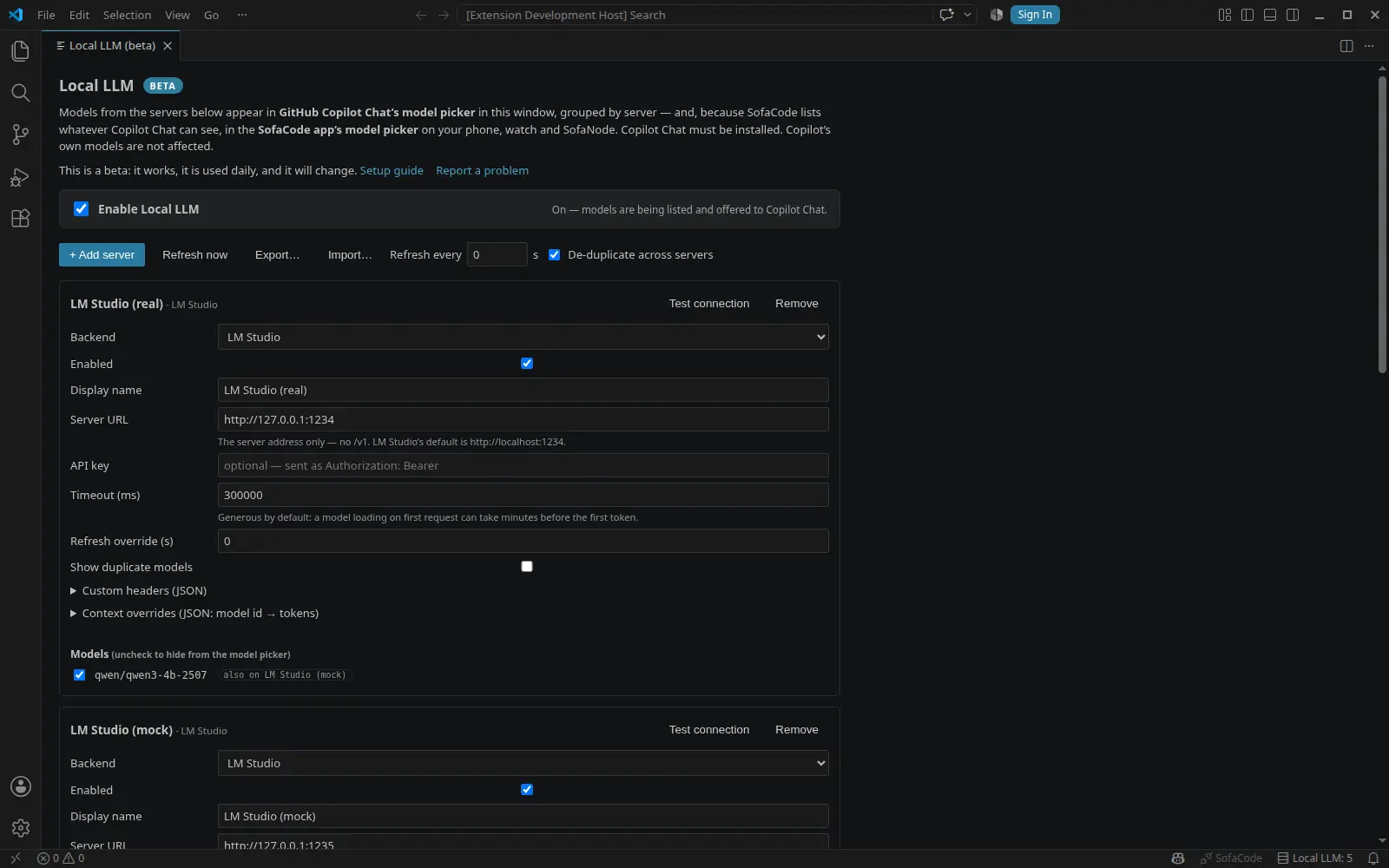
Enable Local LLM
The switch at the top. Until it is on, nothing is registered with VS Code and nothing appears anywhere — you can set servers up first and flip it afterwards. It takes effect at once, no reload.
-
3
Add a server
+ Add server asks which kind — LM Studio, Ollama or Custom (OpenAI-compatible) — and starts the card at that server's default address. Fix the address if the server is on another machine or port, then Test connection: it says what it found (Connected — LM Studio, 4 models (1 loaded)) or the server's own error.
-
4
Pick a model in Copilot Chat
Open Copilot Chat, open its model picker, and your server is a group in the list. The models are re-listed every minute (Refresh now does it immediately). Uncheck a model on its card to keep it out of the picker.
03 · LM Studio
The most complete of the three: LM Studio reports each model's real context length, whether it is loaded, and whether it supports tool calling natively, and Local LLM uses all of it.
-
1
Install LM Studio and download a model
From lmstudio.ai, on the machine with the GPU (or the most memory). In the Discover tab, download a model — Qwen, Llama, Gemma, DeepSeek, Mistral and their coder variants all work; pick a quantization that fits your memory.
-
2
Start the server
Developer tab → Start Server. The default address is
http://localhost:1234. Headless, or from a script:lms server startFor a server on another machine, turn on Serve on Local Network in the server's settings and use that machine's IP in the card, e.g.
http://192.168.1.40:1234. -
3
Add it as an LM Studio server
The card's Server URL is the address only — no
/v1on the end. Test connection, and the models appear, marked loaded when they are in memory.
LM Studio loads a model on its first request when it is not already in memory, and a large one can take a minute or more before the first token. That is why the card's timeout defaults to five minutes. Load the model in LM Studio first, or raise the timeout, if the first reply keeps timing out.
Big context windows
Context size is fixed when LM Studio loads the model; no request can change it. LM Studio's slider stops at the model's native maximum, but the command line does not:
lms load "qwen/qwen3-4b-2507" -c 131072
Local LLM reads the context a model is actually loaded with and tells Copilot to budget for
that, on the next refresh. Watch memory — the cache grows with context and can dwarf the model's weights; add
--estimate-only to preview the cost. If the server does not report the loaded size, set it under
Context overrides on the card.
04 · Ollama
Ollama is the lighter setup — one binary, one command per model — and it runs as a service, so it is there whenever the machine is.
-
1
Install Ollama
macOS and Windows: the installer from ollama.com/download. Linux:
curl -fsSL https://ollama.com/install.sh | sh -
2
Pull a model that can call tools
Copilot's agent mode needs tool calling, and Ollama only advertises it for models built for it. Pick one from the tools-capable list, then:
ollama pull qwen2.5-coder:7bLocal LLM asks Ollama what each model can do and only offers tools for models Ollama says support them; a model without tools still works for plain chat.
-
3
Add it as an Ollama server
The default address is
http://localhost:11434— the address only, no/v1. Test connection reports Connected — Ollama, N models (M running).
Another machine on the network
Ollama listens on localhost only by default. On the serving machine, set
OLLAMA_HOST=0.0.0.0 in the service's environment (on Linux, systemctl edit ollama
and add it under [Service]; on macOS, launchctl setenv OLLAMA_HOST 0.0.0.0 then restart
the app), open port 11434 on its firewall, and use that machine's IP in the card.
Context length
Ollama loads models at a default context that is usually far below what the model supports
(4096 tokens in many versions), which starves an agent session quickly. Raise it for every model with
OLLAMA_CONTEXT_LENGTH=32768 in the same environment, or per model with a Modelfile:
FROM qwen2.5-coder:7b
PARAMETER num_ctx 32768
ollama create qwen-coder-32k -f Modelfile
Local LLM reads the running context from Ollama where the server reports it; otherwise it uses
the model's maximum from its metadata. If Copilot still budgets wrongly, set the number under Context
overrides on the card. Vision models (llava, qwen2.5vl) get image input
automatically.
05 · Custom (OpenAI-compatible)
For anything that speaks OpenAI's /chat/completions with streaming: vLLM,
llama.cpp's llama-server, LocalAI, text-generation-webui, a hosted router such as OpenRouter,
or a server you wrote.
- Server URL is everything up to and including
/v1— the one rule that differs from the other two. Examples:http://localhost:8000/v1(vLLM),http://localhost:8080/v1(llama-server),https://openrouter.ai/api/v1. Local LLM appends/modelsand/chat/completionsto whatever you give it. - API key goes in the card's API key field and is sent as
Authorization: Bearer. Extra headers a server wants go under Custom headers. - No metadata comes back from a generic
/models— not the context length, not what the model can do — so Copilot is told 32k of context unless you set a context override per model on the card. Do that; it is the difference between a useful agent session and a truncated one. - Tools are always offered. Most servers accept or ignore them; one that rejects them says so in the chat, and the message names the server.
vLLM: vllm serve Qwen/Qwen2.5-Coder-7B-Instruct listens on port 8000 and takes
--max-model-len for the context. llama.cpp: llama-server -m model.gguf -c 32768 --port 8080.
Both serve /v1.
06 · Where the models show up
- Copilot Chat's model picker, in that VS Code window, grouped under the server's name with the model id beside it. Copilot's own models stay where they were.
- The SofaCode app's model picker — tap the model line in the ring on the deck, or the model name in the chat header — in the LOCAL section, on phone, watch and SofaNode. LM Studio and Ollama models land there today; models from a custom server appear under a Custom heading until the next app release moves them into LOCAL too.
- Which model a session uses is still chosen where it always was. Local LLM only adds entries to the list.
- The status bar reads
Local LLM: Nwhile the feature is on; click it for the settings page. Turn it off undersofacode.localLlm.showStatusBar.
The app lists the models of the VS Code window it is aimed at. If a model is missing on the phone, open SofaCode: Show Chat Models in that window — that is exactly the list the phone receives.
07 · Several machines
Add each machine as its own server, any mix of kinds. Two things then happen on their own:
- De-duplication. With LM Studio's LM Link, every
machine reports the whole network's models, so the same id shows up on each. Each model is offered once, from
the first enabled server in the list that has it; reorder the
sofacode.localLlm.serversarray insettings.jsonto change which. A server's card says how many of its copies were folded away; Show duplicate models on that card keeps them visible, labeled as duplicates. Turn the whole rule off with"sofacode.localLlm.dedupeAcrossServers": false. - Failover. If the server providing a model cannot serve it — connection refused, model not found, load failed — and nothing has been streamed yet, the request is retried once on every other server that lists the same model.
- One hub is simplest. With LM Link, a single server that is on the link already lists every model on the network and routes each request to the right device, with nothing to de-duplicate.
Hiding a model while de-duplication is on hides that model identity on every server — otherwise it would reappear from a mirror.
08 · Settings reference
Everything the page edits lives under sofacode.localLlm.* in your user settings.
| enabled | The master switch. false by default. |
|---|---|
| servers | The list of servers; the shape is below. |
| dedupeAcrossServers | true: a model listed by several servers appears once. |
| refreshIntervalSec | How often every server is re-listed. 60; 0 = only on demand. |
| showStatusBar | The Local LLM: N item, while the feature is on. true. |
One example server of each kind:
{
  "sofacode.localLlm.enabled": true,
  "sofacode.localLlm.servers": [
    { "backend": "lmstudio", "name": "Desk GPU",  "baseUrl": "http://192.168.1.40:1234",  "enabled": true },
    { "backend": "ollama",   "name": "Laptop",    "baseUrl": "http://localhost:11434",    "enabled": true,
      "contextOverrides": { "qwen2.5-coder:7b": 32768 } },
    { "backend": "custom",   "name": "vLLM box",  "baseUrl": "http://10.0.0.9:8000/v1",   "enabled": true,
      "apiKey": "", "contextOverrides": { "Qwen/Qwen2.5-Coder-7B-Instruct": 32768 } }
  ]
}
| backend | lmstudio, ollama or custom. Absent means lmstudio. |
|---|---|
| baseUrl | Host root for LM Studio and Ollama; up to and including /v1 for custom. |
| apiKey | Optional; sent as Authorization: Bearer. |
| timeoutMs | Socket-idle timeout. 300000 — five minutes, for models that load on first request. |
| headers | Extra request headers, as an object. |
| refreshIntervalSec | Per-server override of the global interval; 0 = use the global one. |
| hiddenModels | Model ids kept out of the picker — what unchecking on the card writes. |
| showDuplicateModels | Keep this server's copies visible when another server already provides them. |
| contextOverrides | Model id → tokens. Wins over anything the server reports; only changes what Copilot budgets for. |
09 · Coming from LM-CODE
Local LLM started as the standalone LM-CODE extension. LM-CODE keeps working and keeps being maintained on its own; the two are separate now and neither updates the other.
- Both on at once means duplicates. Each registers LM Studio models with Copilot, so its picker shows them twice. Local LLM says so when it starts and offers to show you the LM-CODE extension; disable whichever one you are not using.
- Your servers come across. The first time you enable Local LLM with no servers of its own, it offers to copy LM-CODE's — as LM Studio servers, ids and hidden models included. LM-CODE's own settings are read, never changed. The settings page has the same button for later.
- Settings map one to one:
lmstudioCopilot.servers→sofacode.localLlm.servers,lmstudioCopilot.dedupeAcrossServers→sofacode.localLlm.dedupeAcrossServers,lmstudioCopilot.refreshIntervalSec→sofacode.localLlm.refreshIntervalSec,lmstudioCopilot.showStatusBar→sofacode.localLlm.showStatusBar. Server entries gain abackendfield. - Not carried over: the sidebar tree. Everything it showed is on the settings page.
10 · When it goes wrong
The SofaCode · Local LLM output channel (View → Output, pick it in the dropdown) logs every refresh and every request. Start there.
Test connection fails, or no models are listed+
Is the server running, and does the address in the card match — host root for LM Studio and Ollama,
…/v1 for a custom server? The test line quotes the server's own error. For a server on another
machine: is it listening on the network (LM Studio's Serve on Local Network, Ollama's
OLLAMA_HOST), and is the port open on that machine's firewall?
The first reply times out+
The model was still loading. Load it in LM Studio (or ollama run it once) before the first
request, or raise Timeout on the card. The timeout is idle time with no bytes received, not total time.
The server complains about tools, or agent mode is not offered+
Ollama: the model does not support tool calling; pull one from the
tools-capable list. Custom: the server rejected the
tools field — its message is shown in the chat; use a server or model that accepts them.
Replies stop short, or the agent forgets what it was doing+
Context. Copilot budgets prompts to what the server reports, and a custom server reports nothing while Ollama's default is small. Set a Context override on the card — and make sure the server is actually running the model at that size.
The models are in Copilot but not on the phone+
The phone lists the models of the window it is aimed at, and asks for them when it connects. Run SofaCode: Show Chat Models in that window — the list you see is the list it sends — and check the deck is aimed at that machine and window.
"Needs VS Code 1.95 or newer"+
Update VS Code. The chat-model API Local LLM registers with arrived in 1.95; the rest of SofaCode keeps working on older editors, this part cannot.
Everything shows twice in Copilot's picker+
The standalone LM-CODE extension is also on. Disable one of the two — see coming from LM-CODE.
Still stuck? Report it — include the server kind, its version, and the lines from the output channel. Missing a server type or a knob? Ask for it.